Before we get into the how, let's talk about the thing nobody says out loud: most people who've tried tracking food either gave up after three days or turned it into an obsession. Neither of those is the goal. Here's what tracking is actually for — and how to make it work for you.
You Can't Steward What You Can't See
Think about your finances. If you have no idea how much money is coming in and going out each month, making real progress is almost impossible — not because you're bad with money, but because you're working blind.
Your nutrition works the same way.
Most people have a general idea of what they eat. But general ideas don't produce specific results. When women come to me stuck — doing "everything right" but seeing no movement — almost every single time, they're eating more than they realize. Not because they're greedy or undisciplined. Because portion sizes are genuinely hard to estimate, and calories hide in places we don't expect.
"You don't have a willpower problem. You have an awareness problem. Tracking gives you the awareness."
Food tracking is not about obsession. It's not about fear. It's not about earning your meals or punishing your choices. It is simply a tool — a flashlight in a dark room — that shows you what's actually happening so you can make informed decisions.
And once you have that information? You can build a strategy. Not a perfect one. A simple, sustainable one that fits your real life.
Let's Address the Pushback
I've heard every objection. Here are the most common ones — and the honest response to each.
"Tracking feels obsessive. I don't want a bad relationship with food."
This is a legitimate concern — and here's the distinction: obsession is about control and fear. Tracking, done right, is about information. A scale at your doctor's office doesn't make you obsessed with your weight. It just gives your doctor data. Same idea here. If tracking ever makes you anxious or restrictive, that's a signal to pull back. But for most people, awareness is the opposite of obsession — it actually reduces food anxiety because nothing feels "forbidden" when you understand what you're working with.
"I don't have time to log everything I eat."
Logging a meal in MyFitnessPal takes about 60 seconds once you know how it works — and often less for foods you eat regularly since they save automatically. The first week feels slow while you're learning. The second week, it's faster than checking your Instagram feed. I promise you have 5 minutes a day to understand what's fueling your body.
"The numbers don't matter — eating 'clean' should be enough."
Clean eating is a great foundation — but almonds, avocado, and olive oil are all "clean" foods that are also very calorie-dense. I've had clients eating nothing but whole foods and still not losing weight because they were eating 600 calories more per day than they realized. Awareness isn't anti-food; it's pro-results.
"I tried it before and it didn't stick."
That usually means one of two things: you were too strict with it (trying to hit every micro-nutrient perfectly, logging every bite of a cracker), or you didn't have a simple enough system. We're going to keep this extremely beginner-friendly. Done imperfectly every day beats done perfectly for 4 days and then abandoned.
"No discipline seems pleasant at the time, but painful. Later on, however, it produces a harvest of righteousness and peace for those who have been trained by it."
— Hebrews 12:11
How to Actually Start Tracking (The Simple Way)
We're using MyFitnessPal (MFP) — it's free, it has the largest food database available, and it works. Here's your beginner setup, step by step.
1. Download the app & create your free account
Search "MyFitnessPal" in the App Store or Google Play. The free version is all you need to start — don't pay for Premium yet. Set up your profile with your age, height, and current weight. It will ask for a goal — select "lose weight" or "maintain weight" depending on where you are. Don't stress the calorie target it gives you for now. We're just learning to log first.
2. Log your food — don't change it yet
For the first 5–7 days, your only job is to log what you actually eat. Not what you wish you ate. Not a "better" version of your day. What you actually ate. This baseline is gold — it tells both of us exactly what we're working with. No judgment, no changes. Just data.
3. Search by name for packaged foods (or use the barcode scanner)
For packaged foods, type the brand and product name into the search bar — MFP's database is massive and will almost always find it. If you have a Premium account, tap the barcode icon to scan the package and pull nutrition data automatically. For whole foods like chicken breast, eggs, or broccoli, a simple name search works perfectly.
4. Always choose a "verified" food entry
MFP's database is massive — but a lot of it is user-submitted, which means errors happen. When you search a food, look for entries marked with a green checkmark. That's MFP's "verified" badge, meaning the nutrition data has been confirmed against the actual label. When multiple results show up for the same food, always pick the verified one. It takes one extra second and makes your data dramatically more accurate.
5. Focus on these two numbers first: calories and protein
Don't try to track every macro and micronutrient from day one. That's a fast lane to overwhelm. Start with just total calories and total protein. Everything else can come later. MFP now shows both at the top of your diary screen as soon as you open the app.
6. Log it the same day — don't play catch-up
Memory fades fast. A snack at 2pm is much harder to log accurately at 9pm. Get in the habit of logging before or right after each meal. Some people log breakfast while their coffee brews. Pick a trigger that works for your schedule and use it daily.
What You'll See Inside MyFitnessPal
Here's a quick visual walkthrough so the app doesn't feel foreign when you open it.
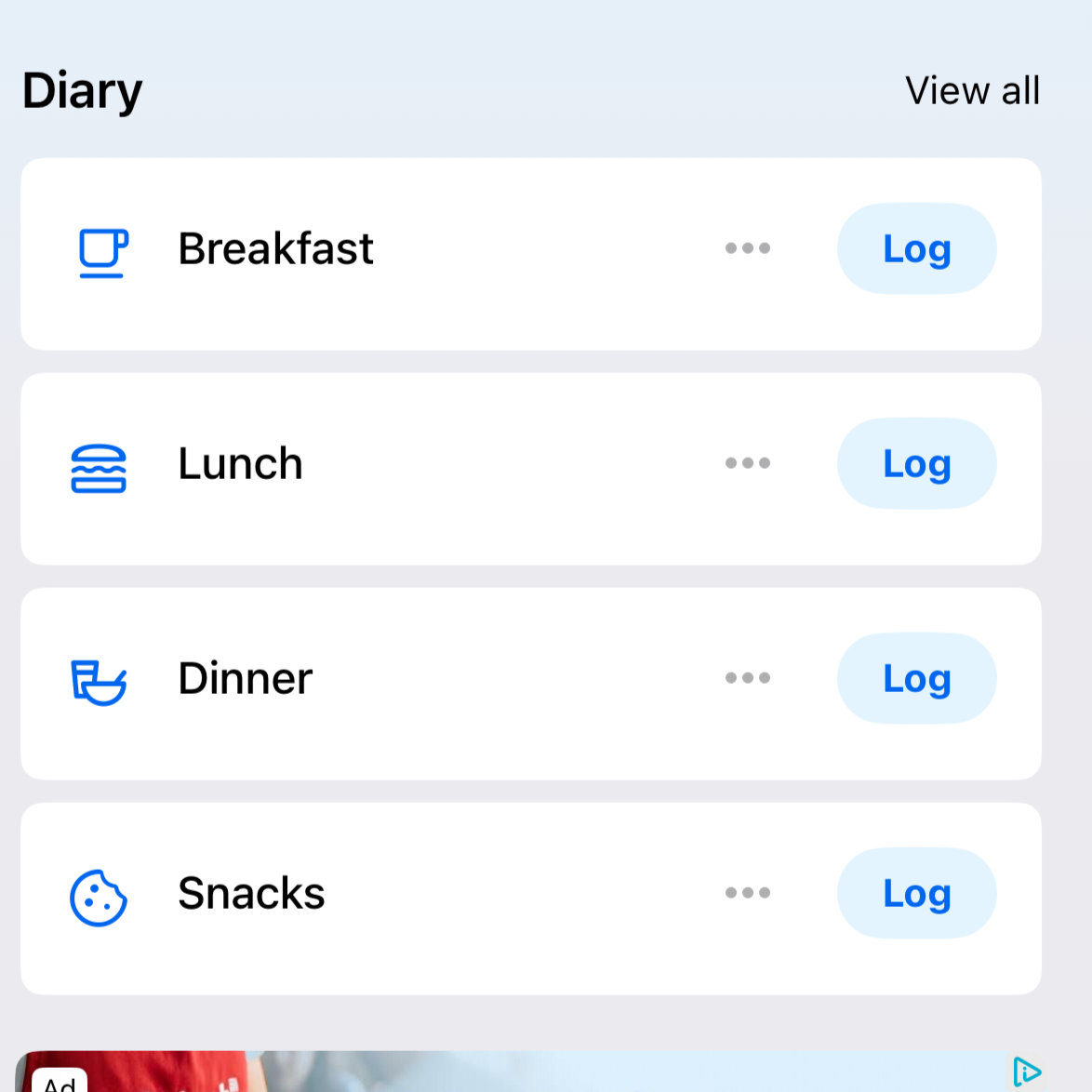
Step 1 — Your Daily Food Diary
Your diary is divided into Breakfast, Lunch, Dinner, and Snacks — tap any "+" to add food to that meal. Everything you log shows up here with its calorie count alongside it.
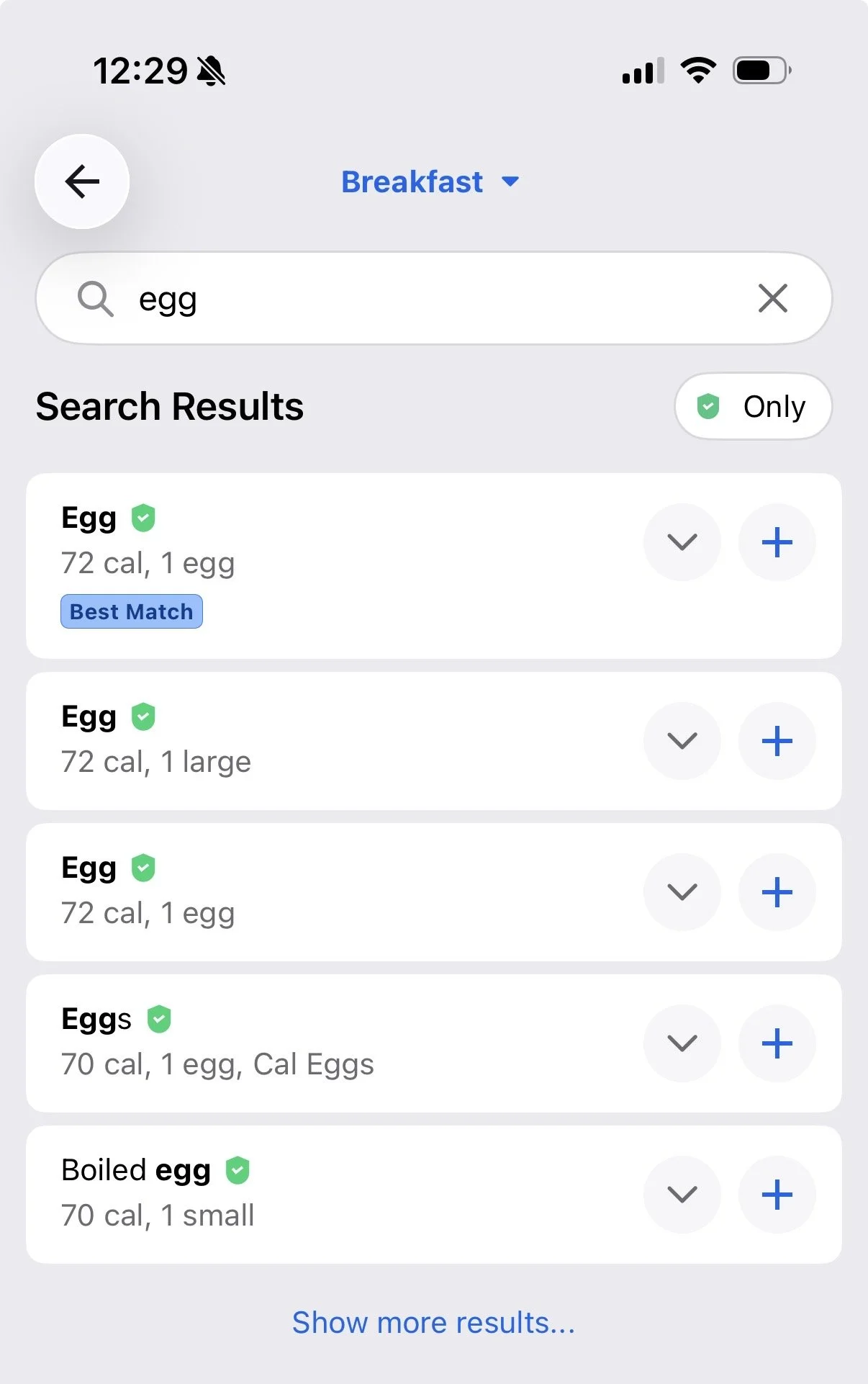
Step 2 — Searching & Adding Foods
Type any food name into the search bar — look for the green checkmark next to results to confirm the entry is verified. Tap the result, confirm your serving size, and hit the checkmark to log it.
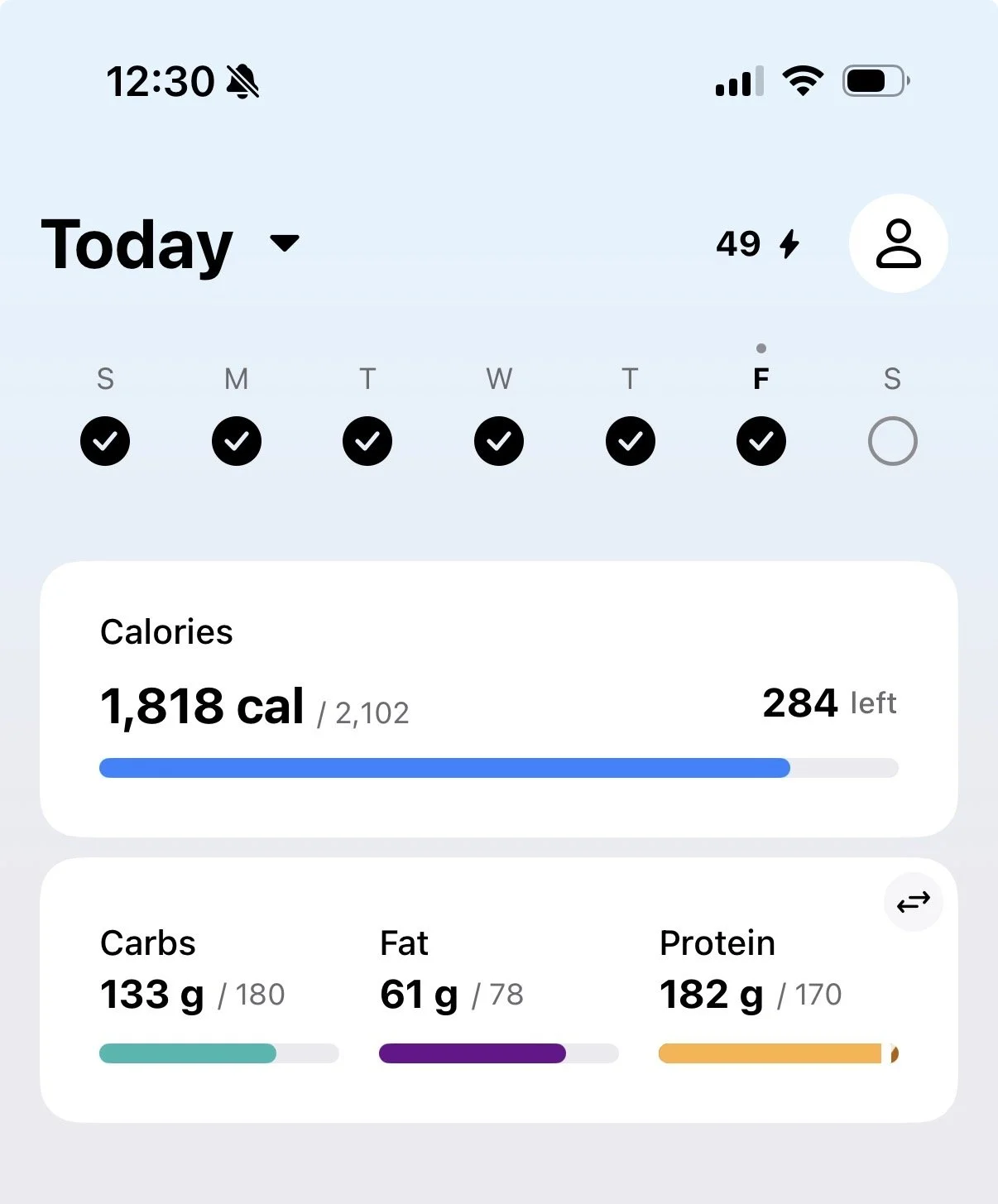
Step 3 — Your Nutrition Summary
Your daily calorie and protein totals now appear at the top of your diary — you'll see them the moment you open the app. Those are the only two numbers you need to pay attention to at first.
Your Questions... Answered
Is tracking food obsessive or bad for your relationship with food?
Not when done correctly. Obsession is rooted in control and fear; tracking is simply about information. Just like a scale at a doctor's office gives useful data without creating obsession, food tracking gives you awareness. For most women, that awareness actually reduces food anxiety because nothing feels forbidden when you understand what you're working with. If tracking ever feels restrictive or anxiety-inducing, that's a signal to pull back.
How long does it take to log food in MyFitnessPal each day?
About 5 minutes per day, or roughly 60 seconds per meal once you know the app. The first week feels slower while you're learning the search and logging process. By week two, foods you eat regularly are saved and log in seconds — faster than checking your social media feed.
Do calories matter if I'm already eating clean?
Yes — even healthy whole foods like almonds, avocado, and olive oil are calorie-dense. Many women eating nothing but clean foods still aren't losing weight because they're unknowingly eating several hundred calories more than they realize each day. Clean eating is a great foundation, but awareness of calories and protein is what produces consistent results.
What should I track first in MyFitnessPal?
Start with just two numbers: total daily calories and total daily protein. Trying to track every macro and micronutrient from day one leads to overwhelm and burnout. MyFitnessPal displays both at the top of your diary screen, so they're easy to check at a glance.
How do I make sure the food entries in MyFitnessPal are accurate?
Always choose entries marked with a green checkmark — that's MyFitnessPal's "verified" badge, meaning the nutrition data has been confirmed against the actual product label. Because much of MFP's database is user-submitted, unverified entries can contain errors. Picking the verified entry takes one extra second and makes your tracking significantly more accurate.
What if I tried food tracking before and couldn't stick with it?
That usually comes down to one of two things: the approach was too strict (tracking every micronutrient, logging every cracker bite), or the system wasn't simple enough. The key is starting with a bare-minimum approach — log what you actually eat, focus only on calories and protein, and aim for consistency over perfection. Done imperfectly every day beats done perfectly for four days then abandoned.
One Last Thing Before You Download the App
This is a tool, not a judge. If you eat a slice of birthday cake and you log it, that is a win — not a failure. The goal in the beginning is simply to get honest with yourself about what's going into your body. From there, we can make a plan.
Remember: the problem has never been your willpower. You've been working hard without the right information. Tracking gives you that information. That's it.
Your Assignment This Week
Download MyFitnessPal and log every meal for 5 days straight. Don't change anything. Just log. See what you find out.
Need Help Getting Set Up?
I'll Walk You Through MyFitnessPal — For Free
If you want help setting up your MFP account, calibrating your calorie and protein targets, and making sure you're starting right — I'll do it with you personally.